Manual
CycleScope
An oscillator scope that holds the waveform still, one cycle at a time.
- Version
- 1.0
- Updated
- 2026-10-30
- Format
- Max for Live · Audio Effect · Free
- Get it
- cotofu.com/devices
What it is
CycleScope is a free Max for Live Audio Effect for looking at the waveform of an oscillator. It detects the pitch of the incoming sound and folds the latest cycles onto one cycle, so the waveform stands still on the screen. A second view shows the spectrum with the harmonics marked. The audio passes through unchanged.
Requirements
- Ableton Live 12 Suite, or Live with Max for Live.
- Max 9.
- Tested on macOS with Live 12 and Max 9.1.
- Windows: not tested yet.
Install
Unzip CycleScope_1.0.zip. The CycleScope 1.0 folder contains:
| File | Purpose |
|---|---|
CycleScope.amxd | Audio Effect: the scope. |
README.txt | Installation notes. |
Keep the folder somewhere convenient, such as your Live User Library. Drag CycleScope.amxd onto the track of a synthesizer: after the instrument on a MIDI track, or on an audio track that receives a hardware synth. The JavaScript is embedded in the device; no separate script installation is needed.
Quick start
- Put
CycleScope.amxdafter a synthesizer. - Hold a note. The waveform stops moving once the pitch is found, and the readout shows the frequency and note.
- Switch the bottom menu to
spectrumto see the harmonics and everything between them. - Double-click the display to open it in a large window. Resize the window to resize the display. Double-click inside the window to close it.
Orange marks what is sounding now. When the input falls below gate, or no pitch is found, the last shape stays on the screen in grey.
Views
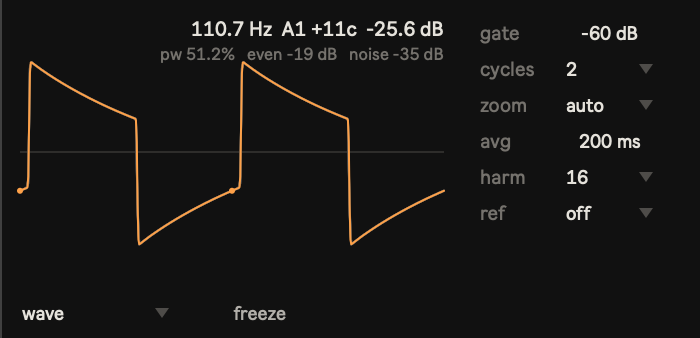
wave — one cycle, averaged over the last few cycles and over the avg time. The cycle starts where the fundamental rises through zero, so a sine starts at zero going up. Faint lines behind the orange line are single cycles; when they spread, the oscillator varies from cycle to cycle. With ref, an ideal waveform is drawn behind, scaled to the measured fundamental.
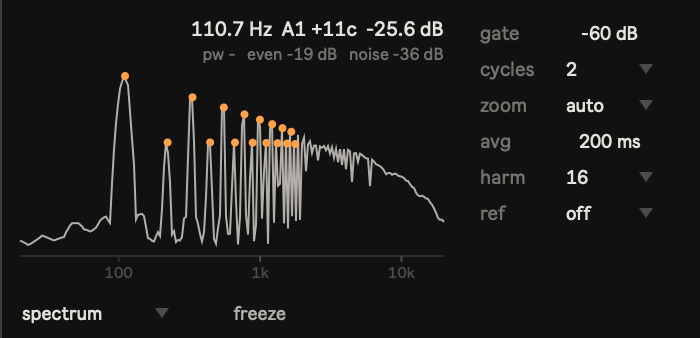
spectrum — the spectrum on a logarithmic frequency axis from 20 Hz to 20 kHz, 0 dB at the fundamental, 80 dB range. Orange dots mark the harmonics (up to harm). With ref, hollow circles show the ideal harmonic levels. Averaging the cycle in wave view removes anything that is not locked to the pitch; the spectrum shows it: aliasing, noise, detuned oscillators, sidebands from FM or sync.
Readouts
| Readout | Meaning |
|---|---|
| frequency, note | Detected pitch. Notes follow Live (C3 = 60), with cents. |
| level | Input level (RMS, dB). |
pw | Pulse width of the averaged cycle. Shown only for pulse- and square-like shapes (two fast transitions per cycle); otherwise -. |
even | Power of the even harmonics relative to the odd harmonics (1–32). A symmetric square or triangle has very low even harmonics; a saw has both. |
noise | Cycle-to-cycle variation (jitter and noise) relative to the averaged cycle. |
Two oscillators with nearly the same averaged waveform can still sound different. In our test, two analogue synths playing the same square wave differed by about 20 dB in even and by 7–20 dB in noise.
Controls
| Control | Range / choices | Default | What it changes |
|---|---|---|---|
gate | −80 to −10 dB | −60 dB | Below this level the display holds the last cycle in grey. |
cycles | 1, 2, 4 | 2 | Cycles shown side by side (wave). |
zoom | auto, 1x, 2x, 4x, 8x | auto | Vertical scale (wave). auto keeps the waveform at a readable size; 1x shows ±1.0 full scale. |
avg | 10–2000 ms | 200 ms | Averaging time for the cycle and the spectrum. Longer is cleaner but slower to follow changes. |
harm | 8, 16, 32 | 16 | Harmonic dots in spectrum view. |
ref | off, sine, triangle, saw, square | off | Ideal waveform / harmonic levels to compare with. |
view | wave, spectrum | wave | Display. |
freeze | off / on | off | Stops updating the display. |
Hover over a control to read its description in Live’s Info View.
Notes
- Analysis uses the sum of left and right. The audio itself is not changed.
- Pitch is detected about seven times per second, from about 25 Hz to 4 kHz. Very narrow pulses at high pitches (for example a 10% pulse above 3 kHz at 44.1 kHz) can be read an octave low.
- The pitch has to be steady for the waveform to stand still. Vibrato, glide and chords blur the averaged cycle.
- Display drawing runs on Live’s main thread. Close the large window when you do not need it.
CycleScope — Cotofu 2026