Manual
Glassy
This is not white noise. A swarm of chaos.
- Version
- 1.0
- Updated
- 2026-10-29
- Format
- Max for Live · Audio Effect
- Get it
- cotofu.com/devices
What it is
Glassy is a Max for Live Audio Effect that plays a chaotic lattice as sound. Hundreds of copies of one simple chaotic map, x → 1 − a·x², are coupled together and stepped at audio rate; Glassy reads the lattice out sample by sample. Depending on two numbers — the nonlinearity a and the coupling epsilon — the elements move as one, split into a few synchronized groups, or scatter into turbulence, and each of these states has its own noise.
Two models are built in, both from Kunihiko Kaneko’s work on spatiotemporal chaos: the globally coupled map (GCM, the default), where every element feels the average of all others, and the coupled map lattice (CML), where each element feels only its neighbours on a ring. Glassy makes noise by itself; an optional input can also push the lattice around.
Requirements
- Ableton Live 12 Suite, or Live with Max for Live.
- Max 9.
- Tested with Live 12.4 / Max 9.1.4 on macOS.
- Windows: not tested yet.
Install
Unzip Glassy_1.0.zip. The Glassy 1.0 folder contains:
| File | Purpose |
|---|---|
Glassy.amxd | Audio Effect: the lattice, its readout and the space-time view. |
README.txt | Installation and release notes. |
Drag Glassy.amxd onto an audio track. It sounds as soon as Live’s audio engine runs; no input is needed. The JavaScript and DSP code are embedded in the device; no other files are required.
Start with the volume down. Glassy produces full-scale noise. The default volume is −6 dB.
Quick start
- Put Glassy on an empty audio track. You hear the default state: GCM,
a1.80,epsilon0.150 — the boundary region where groups keep forming and breaking. - Turn
epsilonslowly. Above about 0.38 the whole lattice locks together; around 0.25 it splits into two groups that alternate; below about 0.10 it becomes turbulent. - Turn
driftup to 0.5–1.0 withdrift timearound 10 s.epsilonnow wanders by itself, and the lattice crosses those boundaries on its own. - Switch
modeltocmland try the settings in the table under The model. - Press
randomizeto jump to a newaandepsilon(the defaults for Rand). Pressrecto record the output into the Arrangement.
The display
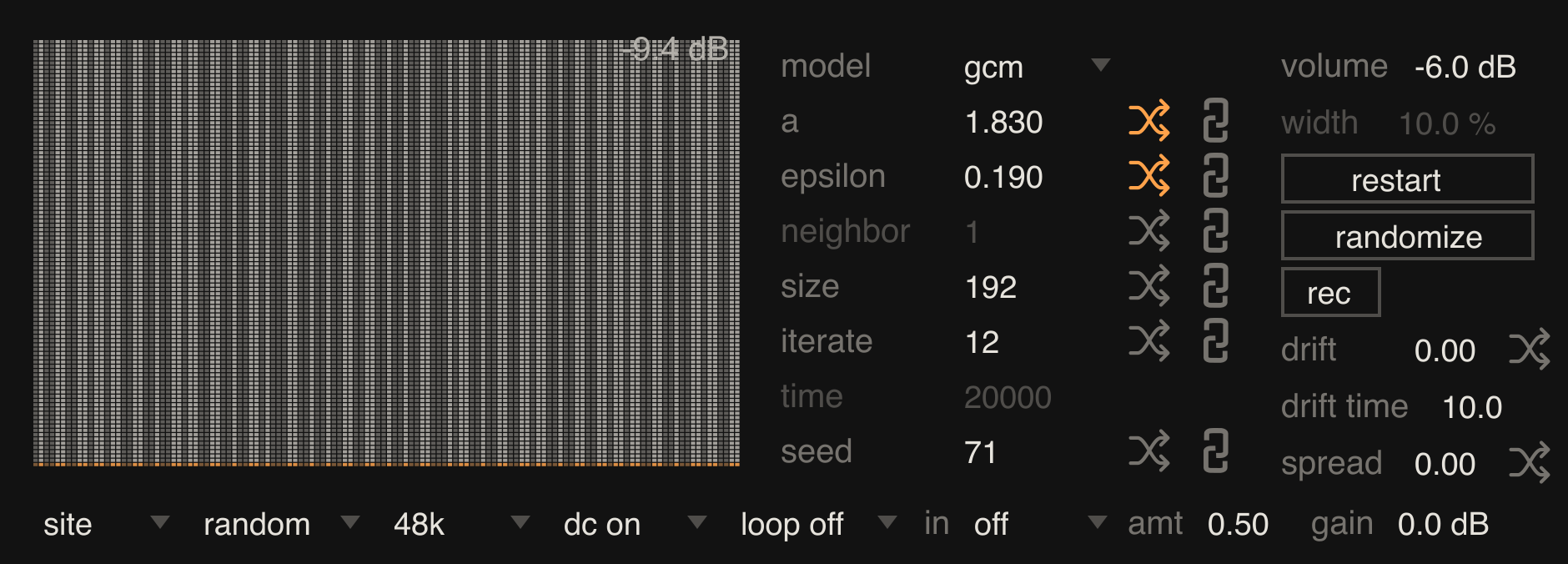
The left panel is a space-time view. Each horizontal row is a snapshot of the lattice: up to 128 cells across, each drawn in grey from dark (x = −1) to light (x = +1). New rows appear at the bottom, drawn in orange, and older rows move up. Vertical stripes mean cells that keep their values; horizontal bands mean the whole lattice changing together; speckle means turbulence.
The top-right corner shows the output level. The top-left corner shows two notes when they apply: cells N when the CPU budget limits the number of cells (see size), and eps x.xxx with the current coupling while drift is moving it.
Controls
Numeric controls support Live’s usual dragging and typed entry. Hover over a control to read its description in Live’s Info View.
Lattice (middle column)
| Control | Range / choices | Default | What it changes |
|---|---|---|---|
model | gcm, cml | gcm | gcm: each element is coupled to the average of all elements. cml: each element is coupled to its two neighbours on a ring. Switching keeps the current state. |
a | 0–2 | 1.800 | Nonlinearity of the map x → 1 − a·x². Below about 1.40 a single map is not chaotic; 2 is fully chaotic. |
epsilon | 0–1 | 0.150 | Coupling strength. 0 leaves every element on its own; large values pull them together. |
neighbor | 1–8 | 1 | In cml, the distance to the two coupled neighbours. Dimmed and inactive in gcm. |
size | 2–4096 | 256 | Number of cells. Changing it restarts the lattice. A CPU budget can lower the number actually used; see below. |
iterate | 1–100 | 20 | Samples of the internal clock per map step. The lattice value is held between steps, so small values give bright, dense noise and large values give low, stepped tones. |
time | 1–1,000,000 steps | 20000 | Loop length, shown also in seconds. Active only when loop is on. |
seed | 0–1,000,000 | 1 | Starting state. The same settings and seed always give the same sound. Changing it restarts the lattice. |
The crossed-arrow and chain icons beside a, epsilon, neighbor, size, iterate and seed select what randomize changes (crossed arrows, orange when on) and what is re-rolled when model changes (chain). drift and spread have crossed-arrow icons only.
Right column
| Control | Range / choices | Default | What it changes |
|---|---|---|---|
volume | −70 to +6 dB | −6 dB | Output level. |
width | 0–100% | 10% | How much of the lattice the input drives (see Input). Dimmed when in is off. |
restart | button | — | Restarts the lattice from seed with the current settings. |
randomize | button | — | Gives new random values to the controls whose crossed-arrow icons are on: a 1.4–2.0, epsilon 0–0.5, drift and spread 0–1, and the full range for the others. |
rec | button | — | Records the output; see Recording. |
drift | 0–1 | 0 | Lets epsilon wander by up to ±0.25 around its setting. The path is fixed by seed, so it repeats exactly with loop. |
drift time | 0.5–120 s | 10 s | Time to move from one drift target to the next. |
spread | 0–1 | 0 | Gives each cell its own a, up to ±0.125 around the setting. A little spread keeps the lattice from settling. |
Bottom menus
| Menu | Choices | Default | What it changes |
|---|---|---|---|
readout | site, mean, spread | site | How the lattice becomes sound. site: left = the cell at one quarter of the ring, right = the cell at three quarters. mean: the average of the left half and of the right half. spread: the standard deviation of each half — silent when the half is synchronized, loud when it is scattered. |
init | random, narrow | random | Starting state. random: every cell anywhere in −1…+1. narrow: all cells close to one value, so you hear the lattice come apart. |
| base rate | 44.1k, 48k, 88.2k, 96k | 48k | Speed of the internal clock, independent of Live’s sample rate. |
| dc | dc off, dc on | dc on | Removes DC below about 7 Hz. Useful for mean and spread, whose output can sit away from zero. |
| loop | loop off, loop on | loop off | Repeats the lattice every time steps. The loop starts from the state when loop was switched on, at a restart, or when model, a, epsilon or neighbor change while looping. |
in | off, site, a | off | Input mode; see below. |
amt | 0–1 | 0.50 | Input amount. |
gain | −24 to +24 dB | 0 dB | Input level before it reaches the lattice. |
Changing size, seed or init, or pressing restart, restarts the lattice with a 5 ms dip in level. Every other control changes the sound from the next step without restarting.
CPU budget. One Glassy is limited to about 25 million cell updates per second. With a large size and a small iterate, it uses fewer cells than requested and shows cells N in the view; for example, size 4096 with iterate 1 at 48k uses 520 cells. size still shows the requested value. Even at the limit, iterate 1 is the heaviest setting.
Input
Glassy ignores its input until in is set. The input is mixed to mono, scaled by gain, clipped to ±1 and averaged between map steps. Only the lattice is heard; for some of the original signal, put Glassy in an Audio Effect Rack beside a dry chain.
- site: a block of cells,
widthwide and centred on cell 0, is pulled toward the input byamt. Incmlthe disturbance travels around the ring and reaches thesitereadout cells after a delay that grows withsize. Ingcmthe block pulls the average that every cell feels. Widths of 5–40% keep the lattice’s own motion audible; near 100% the lattice simply follows the input. - a: the input moves
ain the same block, by up to ±0.5 atamt1, so the input’s waveform switches the lattice between calmer and more chaotic states.
Recording
rec records Glassy’s final output (after volume and dc) as a 32-bit float WAV in ~/Music/Ableton/User Library/Samples/Recorded/, named Glassy YYYY-MM-DD HHMMSS.wav. While recording the button is orange and shows the elapsed time. Press it again to stop: Glassy places the recording as a clip on the same track in the Arrangement, at the song position where recording started. If the clip cannot be placed (for example on a frozen track), the WAV is kept and the device shows rec failed. Use Live’s Collect All and Save to copy recordings into the project.
The model
Both models start from the logistic map in the form f(x) = 1 − a·x², which keeps x between −1 and +1 for a up to 2.
Globally coupled map (GCM) — K. Kaneko, Phys. Rev. Lett. 63, 219 (1989); Physica D 41, 137 (1990):
x_i(n+1) = (1 − ε)·f(x_i(n)) + (ε/N)·Σ_j f(x_j(n))
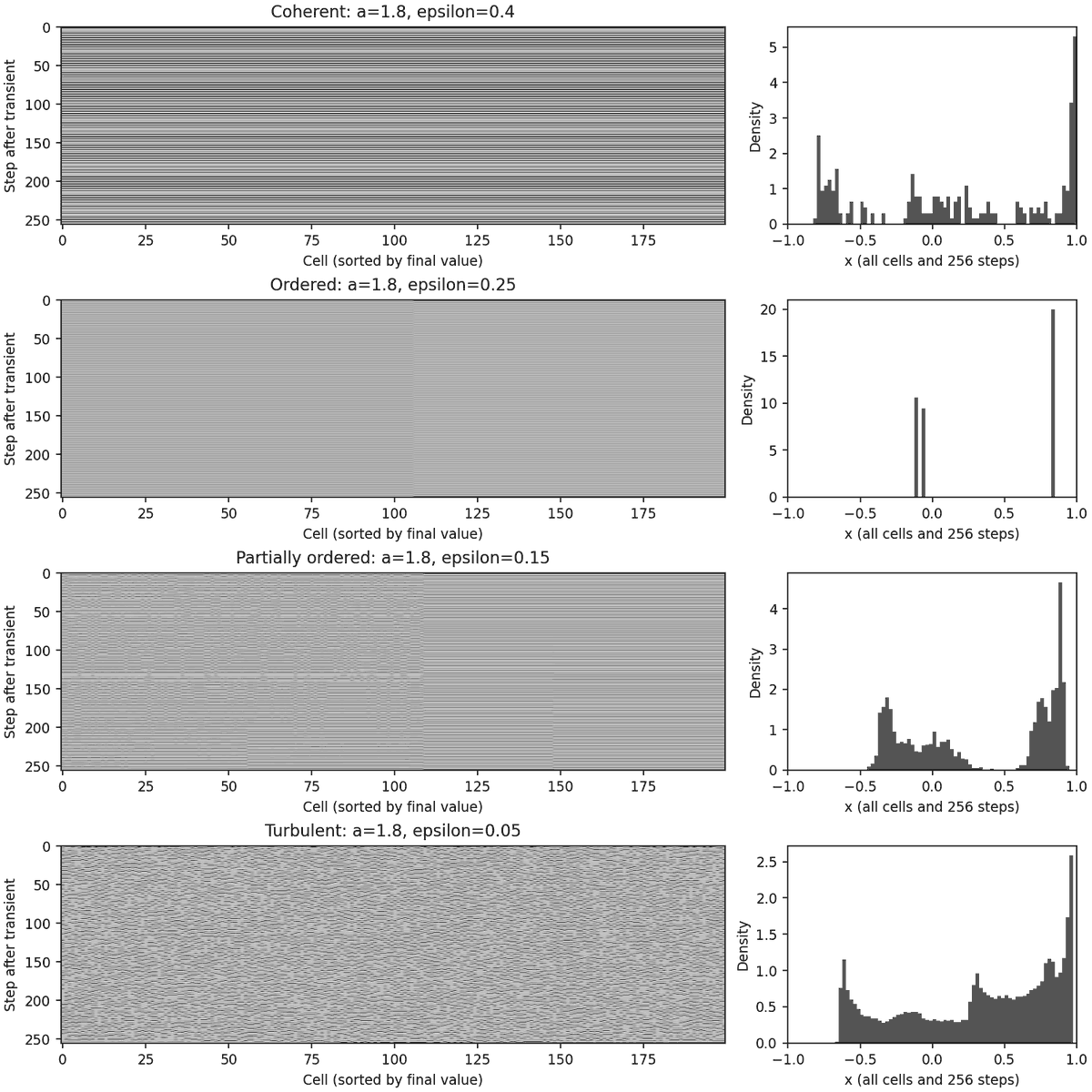
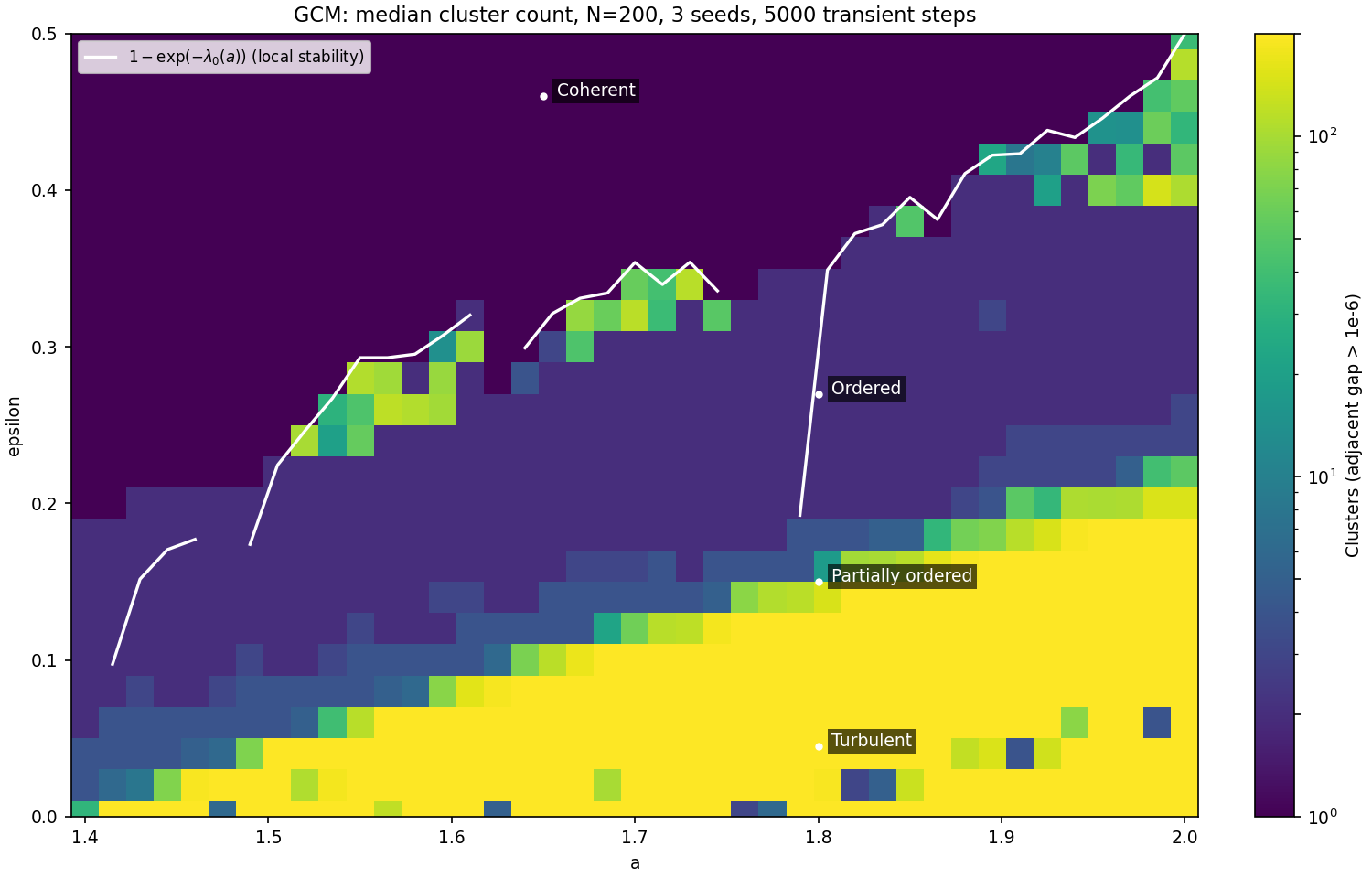
Kaneko found four phases as ε decreases. In the coherent phase all elements move as one. In the ordered phase they split into a few clusters — at a 1.8, ε 0.22–0.30, two clusters swinging in opposite phase. In the partially ordered phase, few-cluster and many-cluster states coexist and the lattice can wander between them for a long time. In the turbulent phase the elements scatter, yet their average keeps fluctuating more than the law of large numbers would allow (Kaneko, Phys. Rev. Lett. 65, 1391, 1990).
Coupled map lattice (CML) — K. Kaneko, Prog. Theor. Phys. 72, 480 (1984); Physica D 34, 1 (1989):
x_i(n+1) = (1 − ε)·f(x_i(n)) + (ε/2)·[f(x_{i−k}(n)) + f(x_{i+k}(n))]
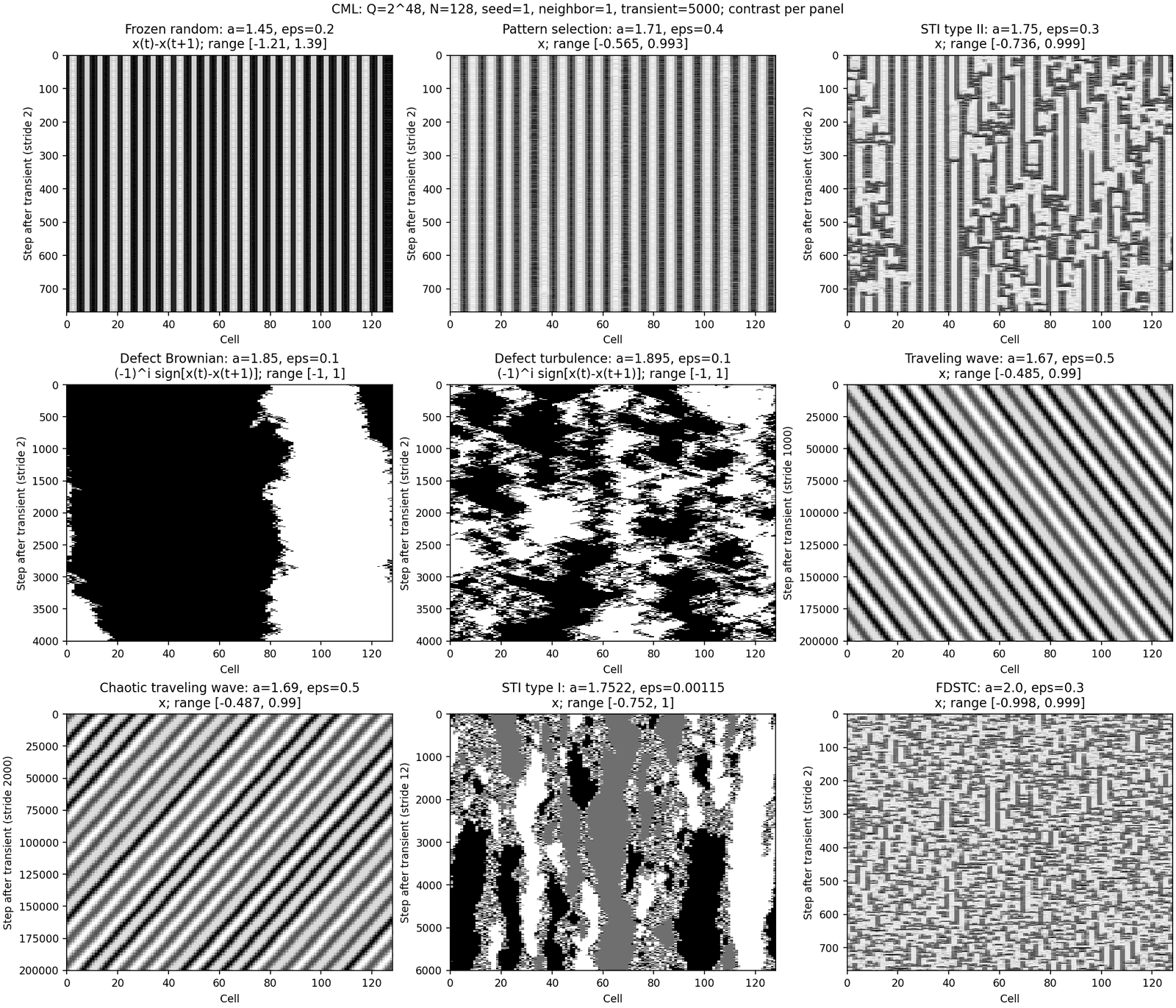
Settings to try (from Kaneko and Yanagita, “Coupled maps”, Scholarpedia 9(5):4085, 2014, with neighbor 1):
| Phase | a | epsilon |
|---|---|---|
| Frozen random pattern | 1.45 | 0.2 |
| Pattern selection | 1.71 | 0.4 |
| Spatiotemporal intermittency | 1.75 | 0.3 |
| Travelling wave | 1.67 | 0.5 |
| Brownian motion of defects | 1.85 | 0.1 |
| Fully developed spatiotemporal chaos | 2.0 | 0.3 |
All updates are synchronous, as in the papers. Glassy computes the lattice in 48-bit fixed point instead of floating point, so the same settings give the same sound on every machine. At this resolution the coherent, ordered and turbulent phases come out as in double-precision calculation; in the partially ordered phase, the number of clusters varies widely with the starting state in both. neighbor above 1, drift, spread, the input and the audio readout are Glassy’s additions.
Tips
- Find the edges. The most varied sound is near phase boundaries: GCM
a1.8 withepsilon0.12–0.20, or CMLa1.75 withepsilonaround 0.3. - Pitch from order. In the ordered phase the lattice repeats every few steps, so
iterateand base rate set a pitch. Try GCMa1.8,epsilon0.25, and sweepiterate. - Long, slow change.
drift0.6–1.0,drift time5–30 s andspread0.2 make a texture that changes for minutes without repeating. - Repeatable phrases. Turn
loopon with a shorttimeto turn any state into a rhythmic figure. - Quiet when synchronized.
readout spreadis silent while each half of the lattice moves together and grows loud when it scatters.
Troubleshooting / FAQ
Glassy is silent. Check volume and the track level. With readout spread, a synchronized lattice is silent by design; lower epsilon or add spread. Check that Live’s audio engine is running.
The input has no effect. Set in to site or a, and raise amt, width and gain. With very narrow width the lattice absorbs the input quickly; try 10–40%.
CPU use is high. Raise iterate or lower size. iterate 1 is the heaviest setting even when the cell count is limited.
size shows 4096 but the view says cells 520. The CPU budget is limiting the cells; see Controls.
Version history
1.0 — 2026-10-29
Initial release.
Credits
Glassy — Cotofu 2026.
The name comes from the partially ordered phase of the globally coupled map, which physicists also call glassy, after glass in the physical sense: a disordered state that freezes before it can find order. Many arrangements of clusters coexist there, and which one the lattice reaches depends on where it starts. The name describes this behaviour, not the timbre. The models are Kunihiko Kaneko’s globally coupled map and coupled map lattice, implemented from the published equations.