Manual
Kowane
Sine-wave speech for Ableton Live, and a companion that lets any instrument speak.
- Version
- 1.1
- Updated
- 2026-10-27
- Format
- Max for Live · Audio Effect + MIDI Effect
- Get it
- cotofu.com/devices
What it is
Kowane is a Max for Live Audio Effect that turns a voice into a bundle of sine waves: sine-wave speech. Kowane MIDI is a companion MIDI Effect that turns Kowane’s analysis into MIDI notes, so an instrument can follow the voice’s changing sound. Use Kowane on its own, or connect one or more Kowane MIDI devices through their from menus.
Requirements
- Ableton Live 12 Suite, or Live with Max for Live.
- Max 9.
- Tested with Live 12.4 / Max 9.1.4 on macOS.
- Windows: not tested yet.
Install
Unzip Kowane_1.1.zip. The Kowane 1.1 folder contains:
| File | Purpose |
|---|---|
Kowane.amxd | Audio Effect: analysis and sine-wave speech. |
Kowane MIDI.amxd | MIDI Effect: analysis-to-note conversion. |
README.txt | Installation and release notes. |
LICENSE-sine_wave_speech.txt | The upstream MIT License. |
Keep the folder somewhere convenient, such as your Live User Library. Drag Kowane.amxd onto an audio track, or after an instrument on a MIDI track. Drag Kowane MIDI.amxd onto a MIDI track, before its instrument. You can also add the folder to Live’s browser and load the devices from there.
The JavaScript is embedded in the devices; no separate script installation is needed. The device filenames stay the same across this update, so their names in Live do not acquire a version number.
Quick start
- Put
Kowane.amxdon a track playing a voice recording, or a track receiving a microphone. For a microphone, enable the track’s input monitoring so audio reaches Kowane. - Play or speak. Kowane’s default settings produce four sine waves, snapped to C major.
- Create a separate MIDI track and put
Kowane MIDI.amxdon it. - In Kowane MIDI’s
frommenu, choose the track containing Kowane. - Put an instrument, such as a piano, after Kowane MIDI. Play the voice again to hear the instrument follow it. The default
spectrummode andretrig onwork well with decaying sounds.
To hear only the MIDI instrument, set Kowane to sines off. With the default mix of 100%, Kowane’s audio output becomes silent while analysis continues. To include some original voice, lower mix.
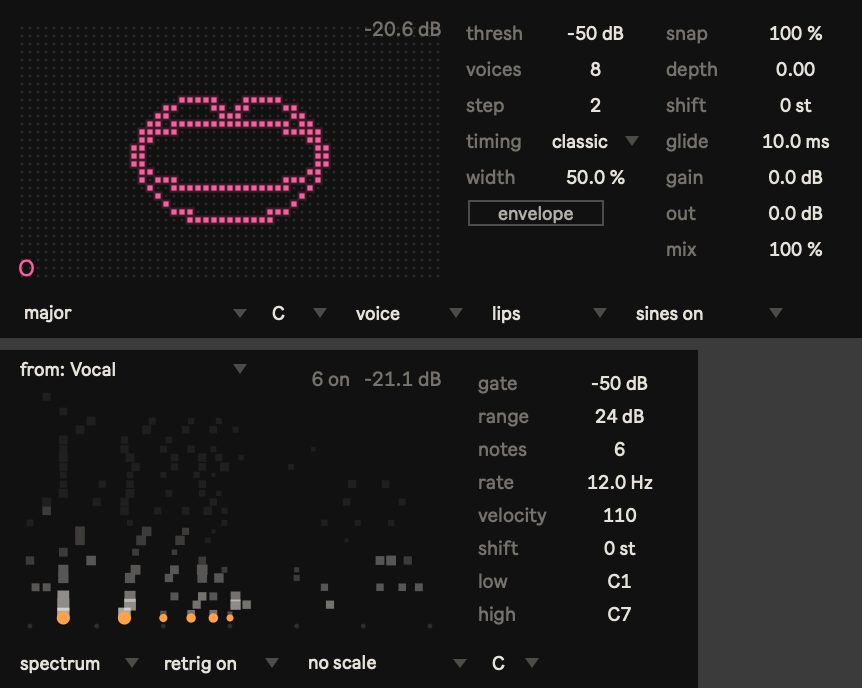
Kowane controls
The two columns beside the display separate analysis and time on the left (thresh, voices, step, timing, width, envelope) from pitch and sound on the right (snap, depth, shift, glide, gain, out, mix). Numeric controls support Live’s usual dragging and typed entry. Hover over a control to read its description in Live’s Info View.
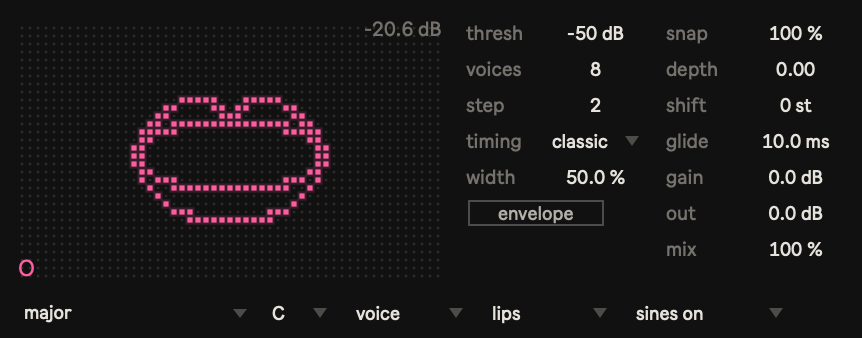
Left column
| Control | Range / choices | Default | What it changes |
|---|---|---|---|
thresh | −80 to −10 dB | −50 dB | Input below this level is treated as silence and the sines stop. |
voices | 1–16 | 4 | Number of sine waves. More waves follow the voice more closely; four gives the classic sine-wave speech sound. Also limits how many notes Kowane MIDI can obtain in formant mode. |
step | 1–16 | 2 | Update interval, in nominal 16 ms units. The default is 32 ms; larger values make changes slower and more separated. |
timing | classic, tight | classic | classic uses the previous step’s pitches while levels glide across a step, about one to two steps behind the input. tight uses the latest analysed pitches and settles levels within 20 ms, reducing delay by about one step. |
width | 0–100% | 50% | Stereo spread. At 0%, every sine is centred. As width increases, higher voices spread alternately left and right; the lowest stays centred. |
envelope | Editor closed / open | Closed | Opens the envelope editor in place of the display. Opening the editor does not enable the envelope; use its on / off control. |
Step durations are approximate: their exact duration depends on the audio sample rate.
Right column
| Control | Range | Default | What it changes |
|---|---|---|---|
snap | 0–100% | 100% | Pull toward the nearest note of the selected scale. At 100%, pitches land on scale notes; lower values retain more original pitch movement. At 0%, no scale pull is applied. Disabled and dimmed when scale is no scale. |
depth | 0–2 octaves | 0 | Lowers the lower sines progressively, leaving the highest unchanged. The lowest is lowered by the full amount. With only one voice, depth has no effect. |
shift | −24 to +24 semitones | 0 | Transposes the sines, after depth and scale snapping. |
glide | 0–100 ms | 10 ms | Smooths pitch changes over this time. At 0 ms, pitch changes are stepped; higher values give a smoother tone. Disabled and dimmed while the envelope is on, because each plucked bundle has fixed pitches. |
gain | −18 to +18 dB | 0 dB | Sine level before soft saturation. Higher gain drives the sines into a more distorted sound. |
out | −36 to +6 dB | 0 dB | Output level after the dry input and sines are mixed. |
mix | 0–100% | 100% | Dry/wet balance: 0% is the original input; 100% is only the sines. |
Snap blends pitches on a logarithmic scale: 50% is halfway in musical pitch between the original and the nearest scale note. Kowane’s pitch and audio-output controls do not transpose or mute the analysis sent to Kowane MIDI; set its own scale and shift separately.
Bottom menus
| Menu | Choices | Default | What it changes |
|---|---|---|---|
scale | See the scale list below | major | Scale used by snap. no scale keeps the original pitches before other pitch processing; chromatic uses every semitone. |
root | C, C#, D, D#, E, F, F#, G, G#, A, A#, B | C | Root of the selected scale. |
source | voice, full | voice | voice uses pre-emphasis for speech. full removes pre-emphasis and retains more low-frequency content for drums and instruments. |
view | vowel, trace, lips | lips | Chooses the visual display; see Views below. |
sines | sines off, sines on | sines on | Mutes or enables the sine output. Analysis continues when off. The dry level still follows mix, so sines off with mix at 100% is silent. |
Both devices offer the same scale menu, grouped as follows. These are the labels shown in the menu.
| Group | Options |
|---|---|
| basic | no scale, chromatic, major, minor, major penta, minor penta |
| modes | dorian, phrygian, lydian, mixolydian, locrian |
| other | harmonic min, melodic min, blues, whole tone, diminished |
| japanese | hirajoshi, miyako-bushi, yo, ryukyu, iwato |
| chords | major triad, minor triad, major 7th, minor 7th, dominant 7th, sus4, fifths, octaves |
Envelope editor
Click envelope to open or close the editor. When enabled, each step starts a plucked bundle of sines at fixed pitches. Each bundle follows an attack–decay–sustain–release shape and ends after its chosen length. Version 1.1 uses this single pluck behavior; there is no gate/pluck mode selector.
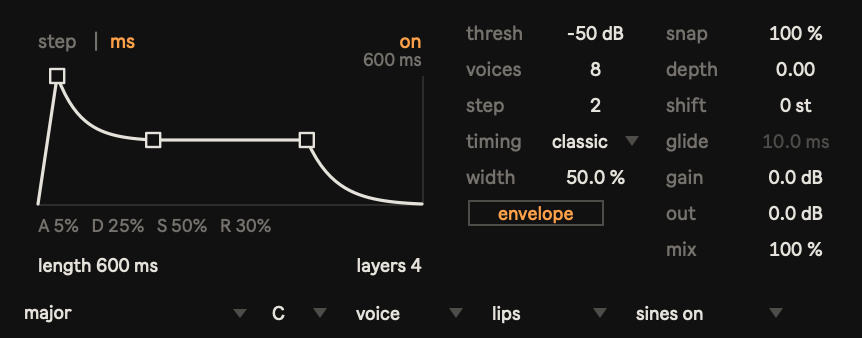
| Control | Range / choices | Default | How to use it |
|---|---|---|---|
on / off | Off, on | Off | Click at the upper right to enable or disable the plucked bundles. |
step / ms | Step units, milliseconds | step | Click at the upper left to choose the length unit. |
length in step units | 1–16 steps | 1 step | Drag vertically. Duration follows Kowane’s step interval; at the default step size, one step is about 32 ms. |
length in ms | 20–2000 ms | 400 ms | Drag vertically. Duration stays in milliseconds when Kowane’s step size changes. The two length units retain separate values. |
layers | 1–8 | 1 | Drag vertically to set the maximum number of overlapping bundles. When a new bundle replaces the oldest, the old bundle fades out over 5 ms to avoid a click. |
| A — attack | 0–100% of length | 5% | Drag the peak handle horizontally to set the rise time. Drag it fully left to set A to 0%. |
| D — decay | 0–100% of length | 25% | Drag the middle handle horizontally to set the time from the peak to the sustain level. |
| S — sustain | 0–100% of peak | 50% | Drag the middle or right handle vertically to change the sustain level. |
| R — release | 0–100% of length | 30% | Drag the right handle horizontally. Moving it left lengthens the release at the end of the bundle. |
Extending a stage can shorten its neighbours so the shape fits the bundle length. The remaining time between decay and release holds the sustain level. For click control, the audio engine retains a minimum 1 ms attack and 3 ms release, including when the editor shows 0%. Envelope values are saved with the device and are available as Live parameters for automation.
Kowane MIDI controls
Kowane MIDI receives analysis from Kowane and generates notes for the instrument after it, or for an external MIDI destination. Its envelope mode describes the voice’s spectral envelope; it is separate from Kowane’s plucked amplitude envelope.
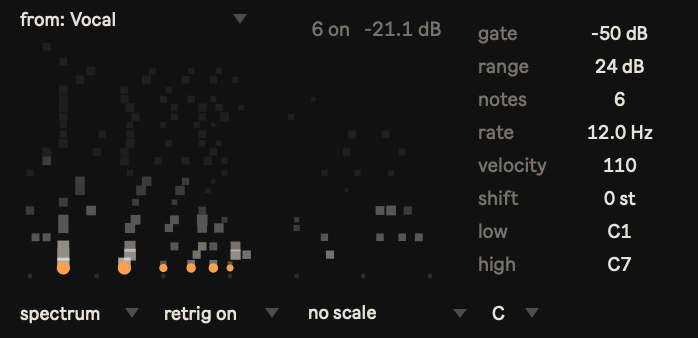
| Control | Range / choices | Default | What it changes |
|---|---|---|---|
from | from: none, tracks containing Kowane | from: none | Selects the analysis source. The list includes regular and return tracks, including Kowane inside racks. Multiple Kowane MIDI devices can select the same source. |
mode | formant, spectrum, envelope | spectrum | Chooses how analysis becomes notes; see below. |
gate | −80 to −10 dB | −50 dB | Stops all generated notes when input falls below this level. |
range | 6–60 dB | 24 dB | In spectrum and envelope, admits candidates within this many dB of the strongest candidate. A larger range includes weaker components. In all modes, it also affects velocity scaling; in formant, it does not discard candidates. |
notes | 1–16 | 6 | Maximum simultaneous generated notes in every mode. In formant, selects the strongest available sines, up to Kowane’s voices count. Several candidates can map to the same note, so fewer notes may sound. |
rate | 1–50 Hz | 12 Hz | How often notes are updated, in updates per second. Updates also depend on analysis arriving from Kowane. |
velocity | 1–127 | 110 | Maximum velocity. Input level and each candidate’s relative strength determine velocities from 1 to this value. |
shift | −24 to +24 semitones | 0 | Transposes candidates before scale mapping and note-range processing. |
low | MIDI note 0–127 | 36 (C1) | Lowest note to play. |
high | MIDI note 0–127 | 108 (C7) | Highest note to play. Live’s octave naming uses C3 = MIDI note 60. Keep low at or below high. |
retrig | retrig off, retrig on | retrig on | When on, strikes selected notes again at each update. Useful for piano and other decaying sounds. When off, a note remains held while it stays selected. |
scale | Same grouped menu as Kowane | no scale | Maps notes onto the selected scale. no scale allows all MIDI notes; MIDI notes still use semitone pitches. |
root | C, C#, D, D#, E, F, F#, G, G#, A, A#, B | C | Root of the selected scale. |
Choosing a mode
formantconverts each available sine/formant frequency to a note and keeps the strongest candidates up tonotes. Kowane’svoiceslimits the available candidates. Out-of-range notes are folded by octaves intolow–highwhen the range spans at least 12 note positions; for narrower ranges, out-of-range notes are omitted.spectrumfinds peaks in an 88-key spectrum, including pitch and harmonics, then plays the strongest candidates. This is the starting point for making a piano speak. Candidates outsidelow–highare omitted.envelopemaps the smooth spectral envelope of the voice onto the keyboard, selecting its strongest regions rather than individual harmonic peaks. It emphasizes vowel colour and can create clusters. Candidates outsidelow–highare omitted.
The source selection follows track renaming and reordering during a session. It is saved by track name for reopening a Set; distinct source-track names make that selection unambiguous. Keep one Kowane per source track, because devices on the same track share that track’s analysis destination.
Views
The view menu changes Kowane’s display without changing its sound.
vowel shows the first two formants, F1 and F2, on a chart normalized to the speaker. Higher F1 appears lower in the chart; higher F2 appears further left. White dots show the recent path, the orange dot is the current position, and the nearest vowel label brightens. The labels a, i, u, e, and o correspond to the five Japanese vowels. Normalization adapts while speech arrives, so the position can shift as it learns the speaker.
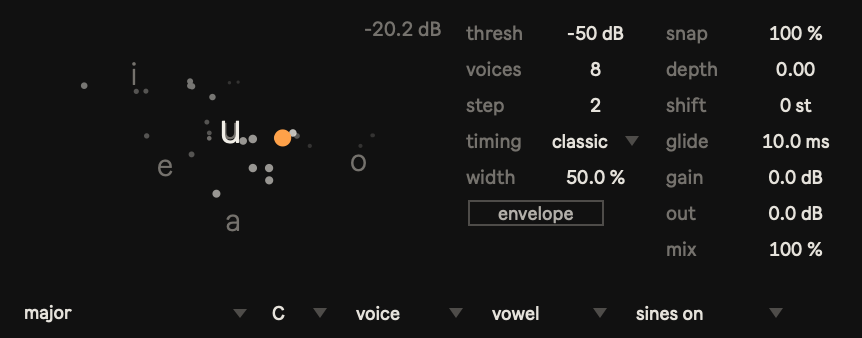
trace shows the sine frequencies over time, with higher frequencies higher on the display and recent values at the right. White trails distinguish the voices, with stronger emphasis on lower voices; orange markers show the current values.
lips, the default, draws a mouth with pink dots. Higher F1 opens the jaw; higher F2 widens the lips. Input level also affects opening and brightness, and the mouth closes during silence. A nearby vowel label appears at the lower left. This is a visualization derived from formants, not a measurement of the speaker’s actual mouth.
Kowane MIDI has a note display rather than a view menu. Horizontal position indicates pitch within low–high; dot size indicates velocity. Note strikes rise and fade, while orange dots along the bottom show notes currently held.
Tips
- Try drums and instruments. Set Kowane’s
sourcetofullto retain the low end without speech pre-emphasis. Return tovoicefor speech. - Drive several instruments from one voice. Put Kowane MIDI before each instrument and choose the same source track in every
frommenu. Give each instance its own mode, note count, range, scale, and rate. - Reduce CPU use. Lower Kowane’s
voices. When its envelope is enabled, lowerlayersto reduce overlapping bundles. - Recover the stepped pitch movement of sinewavespeech.com. Set
glideto 0 ms and usetiming classicwith the envelope off.no scale,depth0,shift0, andwidth0 remove Kowane’s additional pitch and stereo changes. - Use larger steps for slower changes. A larger
stepcollects a longer slice of input before analysis can finish.classicthen uses the previous step’s pitches and ramps levels across another step, so increasing step size also increases audible delay.
Troubleshooting / FAQ
Kowane is silent.
Check that audio reaches the device and that its track is audible. Lower thresh if the voice is being treated as silence. Check sines: sines off mutes the synthesized sound but leaves the dry level at the current mix setting. At mix 100%, this is silent; at mix 0%, you hear only the original input. Also check out and the track level.
No MIDI arrives, or the source does not appear in from.
Put Kowane on the separate source track and confirm that it is receiving audio. Put Kowane MIDI before an instrument on the receiving MIDI track, or provide that track with a valid external MIDI output. Select the source explicitly in Kowane MIDI’s from menu. The source audio track does not need a MIDI output: analysis is passed between the devices. The menu looks for a device name containing Kowane without MIDI, so retain that name if you rename devices. For missing notes with a connected source, check Kowane MIDI’s gate, low, and high; in formant mode also check Kowane’s thresh.
What does no signal mean?
A source is selected, but Kowane MIDI has not received the source’s status message for about 1.5 seconds. Check the source device and Live’s audio engine. This reports missing communication, not simply an input level below the gate. If analysis stops, a separate timeout releases generated notes after roughly 250 ms, checked every 100 ms.
There is too much delay.
Reduce Kowane’s step and select timing tight. In Kowane MIDI, a low rate also spaces note updates further apart. Live’s audio buffering and the receiving instrument can add their own delay.
Snap seems inactive.
Select a scale other than no scale. Snap is dimmed and has no effect with no scale; its value is retained. Set it to 100% to hear the strongest pull toward the selected notes.
Glide is dimmed.
Kowane’s envelope is on. Plucked bundles keep fixed pitches, so glide is unavailable. Turn the envelope off to use glide.
Version history
1.0 — 2026-10-27
Initial release of Kowane and Kowane MIDI.
1.1 — 2026-10-27
- Envelope now uses a single pluck behavior; the former gate mode has been removed. Choose length in steps (1–16) or milliseconds (20–2000), with 1–8 overlapping layers. Replacing the oldest bundle uses a 5 ms fade to remove clicks, and the editor now allows attack to be set to 0%.
- Added
width(0–100%) to spread the sines in stereo. - Changed
snapfrom the former 0–3 stages to a continuous 0–100% pull toward the selected scale. Snap is dimmed whenno scaleis selected. - Added
glide(0–100 ms, default 10 ms) to smooth pitch changes. Set it to 0 ms for the original stepped sound. - When updating Sets made with 1.0, revisit
snap: values from the former 0–3 range are small amounts in the new percentage range. Reset snap to the amount you want.
Credits / license
Kowane — Cotofu 2026.
Kowane’s core sine-wave speech analysis and synthesis build on sine_wave_speech by Václav Volhejn (MIT License); portions of that code were adapted for Kowane. Everything around it — the Max for Live devices, scale snapping, glide, width, the envelope, the views and Kowane MIDI — is Kowane’s own. The full MIT license text is included in the zip as LICENSE-sine_wave_speech.txt and is available at cotofu.com/licenses/.